We independently review everything we recommend. When you buy through our links, we may earn a commission. As an Amazon Associate we earn from qualifying purchases.
Best 64GB SD Cards: 4 Full-Size SDXC Cards for Cameras and Everyday Shooting
Find the best 64GB SD cards for cameras and everyday shooting. Compare read speeds, video classes, and durability across four full-size SDXC cards today.
Find the best 64GB SD cards for cameras and everyday shooting. Compare read speeds, video classes, and durability across four full-size SDXC cards today.
The best 64GB SD cards give a camera enough room for a long day of shooting without forcing a card swap at the worst moment, and they do it at a capacity that stays sensible for most photographers. A 64GB card holds thousands of high-resolution photos or hours of Full HD video, which makes it a practical middle ground: roomier than a 32GB card, yet easier to manage than a single very large card that would put every image from a trip on one piece of storage. If your camera takes a full-size SD slot, a 64GB SDXC card is often the simplest upgrade you can make.
Quick answer: the SanDisk Extreme PRO SDXC 64GB is the strongest all-round choice in this guide, with read speeds up to 200MB/s, write speeds up to 90MB/s, and U3 and V30 ratings that suit 4K video and burst photography. If your shooting is mostly stills and Full HD video, the SanDisk Ultra SDXC 64GB at up to 140MB/s covers everyday needs at a lower tier of performance. The rest of this guide explains how to match a card to your camera, your video settings, and your workflow, then reviews four full-size 64GB SDXC cards in detail.
Every card in this guide is a full-size SDXC card with 64GB of storage. None of them is a microSD card, and none relies on an adapter to fit a standard SD slot. That distinction matters, because a microSD card in an adapter can work in a pinch, but a native full-size card seats more securely in a camera and avoids the extra point of contact that an adapter introduces. If your device has a microSD slot instead, such as a phone, a tablet, or a drone, look for a microSD guide rather than buying one of the cards below.
The first check is physical. A full-size SD card measures about 32 by 24 millimetres and slides directly into the SD slot found on most DSLR cameras, mirrorless cameras, camcorders, and laptops. A microSD card is much smaller, about 15 by 11 millimetres, and belongs in phones, tablets, action cameras, drones, and handheld consoles. The two are not interchangeable without an adapter, and an adapter is a workaround rather than a proper fit for a camera that will be carried, bumped, and used outdoors.
Check your camera manual or the slot itself before ordering. If the slot is labelled SD, SDHC, or SDXC, a full-size card is what you need. If it is labelled microSD, buy a microSD card instead. Buying the wrong form factor is the most common and most avoidable mistake in this category, and it is also the easiest to prevent with a thirty-second check.
Capacity Reality: What 64GB Actually Holds
Manufacturers measure a gigabyte as one billion bytes, while cameras and computers count storage slightly differently, so the usable space on a 64GB card is a little under the labelled figure. Formatting also reserves a small amount of space. In practice, that still leaves room for a very large number of photos: several thousand JPEG images from a typical 24-megapixel camera, or a smaller but still generous number of RAW files, which are much larger because they preserve far more image data.
For video, 64GB holds hours of Full HD footage at ordinary bitrates, and a useful amount of 4K footage depending on the bitrate your camera records at. High-bitrate 4K fills a card far faster than Full HD, so videographers who record long 4K sessions often carry two or three 64GB cards rather than one.
Read Speed Versus Write Speed
Read speed and write speed describe two different jobs, and both matter. Write speed governs how fast the camera can save photos and video to the card. It decides whether burst shooting keeps up, whether 4K recording runs without interruption, and how long the camera takes to clear its buffer after a long burst. Read speed governs how fast files move off the card onto a computer, which decides how long an import takes after a shoot.
A card can be fast in one direction and modest in the other. The headline number on the packaging is usually the read speed, which is the larger figure, so always look for the write speed as well before judging a card. For stills photography, a strong write speed keeps the camera responsive. For video, the minimum sustained write speed matters even more than the peak figure, because a video recording cannot pause while the card catches up.
Speed Classes: U1 Versus U3, V10 Versus V30
Speed class markings look cryptic, but they describe guaranteed minimum write speeds, which is exactly what video recording needs. Class 10 means a minimum sustained write speed of 10MB/s. U1, the UHS Speed Class 1 marking, also guarantees at least 10MB/s. U3 guarantees at least 30MB/s. The Video Speed Class markings work the same way: V10 guarantees 10MB/s, while V30 guarantees 30MB/s.
For Full HD video, a Class 10 or U1 card is generally sufficient. For 4K video, look for U3 and V30, which guarantee the 30MB/s minimum that higher-bitrate 4K recording requires. A card without a V30 marking can still record 4K at lower bitrates, but the margin is thinner, and a dropped frame or a recording error is more likely when the camera is writing at its highest setting. Matching the class to the video mode is a more reliable guide than comparing headline read speeds.
UHS-I and Your Camera or Reader
All four cards in this guide use the UHS-I bus, which is the interface standard found on the great majority of cameras, laptops, and card readers in everyday use. UHS-I supports the speeds quoted for these cards when the host device and the reader also support it. A card will still work in an older non-UHS host, but it will run at the older bus speed, so the quoted figures will not apply.
Faster UHS-II cards exist, and they can reach higher speeds, but they only deliver those speeds in a UHS-II camera slot and a UHS-II reader. In a UHS-I camera, a UHS-II card falls back to UHS-I speeds, so the extra capability goes unused. Unless your camera and your reader both support UHS-II, a good UHS-I card is the sensible match, and it avoids paying for speed your equipment cannot use.
Durability and the Write-Protect Switch
Memory cards travel in pockets, bags, and camera compartments, so physical toughness is a real consideration. The SanDisk cards in this guide are described by the manufacturer as waterproof, temperature-proof, shockproof, and X-ray-proof, which covers the ordinary hazards of travel and outdoor shooting: rain, a hot car, a drop onto a hard floor, and airport security scanners. No card is indestructible, and none of these protections is a substitute for backing up important files, but a rugged card gives a useful margin of safety.
Every full-size SD card also has a small write-protect switch on its edge. Sliding it to the locked position prevents the camera or computer from writing to or erasing the card, which is a handy safeguard when handing a card to someone else or when archiving a finished shoot. Check the switch first if a camera reports that a card is locked, because the switch is easy to move by accident when handling the card.
Buying From a Trusted Source
Counterfeit memory cards are a genuine problem, and a fake card can report a larger capacity than it truly has, then lose files once the real capacity is exceeded. The safest approach is to buy from a well-known retailer or directly from a reputable seller, and to be cautious of listings with vague descriptions, missing model numbers, or packaging that looks different from the brand’s usual design. After buying a card, format it in the camera you will use it in, then fill it with a large test transfer before trusting it with irreplaceable photos. A genuine card will accept its full labelled capacity without errors.
The SanDisk Extreme PRO SDXC 64GB is the fastest card in this guide and the natural first choice for demanding photography and 4K video. It is rated for read speeds up to 200MB/s and write speeds up to 90MB/s, with Class 10, U3, and V30 ratings, which means it guarantees the minimum sustained write speed that high-bitrate 4K recording needs. The model number is SDSDXXU-064G-GN4IN, and it is built for DSLR and mirrorless cameras that shoot bursts of RAW files or long 4K clips.
In use, the difference between this card and a slower one shows up in two places: the camera clears its buffer faster after a burst, so you can keep shooting sooner, and file transfers to a computer finish sooner when you are importing a full card. The card is also built to withstand water, temperature extremes, shock, and X-rays, which suits outdoor and travel photography. Its main limitation is capacity rather than speed: 64GB fills quickly when recording high-bitrate 4K, so videographers should plan on carrying a spare.
The SanDisk Extreme SDXC 64GB sits one step below the Extreme PRO and covers the same core use cases at a more moderate performance tier. It is rated for read speeds up to 150MB/s, with Class 10, U3, and V30 ratings, so it carries the same 30MB/s minimum sustained write guarantee that 4K recording calls for. The model number is SDSDXV6-064G-GNCIN. For photographers who shoot 4K occasionally rather than constantly, or who record Full HD most of the time and want headroom for 4K, this card provides that headroom without stepping up to the fastest tier.
Write speeds on this card are lower than on the Extreme PRO, which means burst sequences take a little longer to clear and very long 4K takes have less margin, but for most mirrorless and DSLR cameras the difference is modest in everyday shooting. The card shares the same rugged construction as its faster sibling, with protection against water, temperature extremes, shock, and X-rays. It is a well-judged middle option: fast enough for 4K, sensible for stills, and a good fit for a camera that will be used for both.
The SanDisk Ultra SDXC 64GB in its current 140MB/s version is the everyday pick in this guide. Its model number is SDSDUNB-064G-GN6IN, and it is rated for read speeds up to 140MB/s with a Class 10 and U1 speed class, which suits Full HD video and stills photography. For a point-and-shoot camera, a camcorder recording Full HD, or a laptop that needs extra storage for photos, this card provides fast transfers and dependable behaviour without the higher write performance that only 4K and heavy burst shooting require.
The limitation to understand is the speed class: U1 guarantees a minimum sustained write speed of 10MB/s, which is ample for Full HD but not the right guarantee for high-bitrate 4K. Buyers who plan to record 4K regularly should choose one of the U3 and V30 cards above instead. The card is not discontinued by the manufacturer, and it carries the same waterproof, shockproof, temperature-proof, and X-ray-proof construction as the faster SanDisk cards. For general photography and Full HD video, it is a capable and straightforward choice.
The older SanDisk Ultra SDXC 64GB, model SDSDUNC-064G-GN6IN, is rated for read speeds up to 80MB/s with Class 10 and U1 markings, and it remains a serviceable option for basic cameras. It suits point-and-shoot cameras, older camcorders, and any device where the workload is stills and Full HD video at ordinary bitrates. Transfers are slower than on the 140MB/s Ultra above, so importing a full card takes noticeably longer, and the card is not a good match for burst-heavy RAW shooting or 4K video.
Buyers should note that this is an older generation of the Ultra line, and the 140MB/s version above is the current revision of the same idea, so the older card only makes sense where it is the version actually stocked and its slower transfer speed is acceptable. Check the model number on the listing before ordering, because several Ultra revisions share similar packaging and the speed figure is the clearest way to tell them apart. For a second camera, a backup card, or a device with modest demands, it still does the job it was designed for.
What to Check Before You Buy
Before ordering, confirm three things. First, confirm the slot: your camera needs a full-size SD slot, and it needs to support SDXC cards, which use the exFAT file system. Very old cameras that only support SDHC may not accept a 64GB SDXC card, so check the manual if your camera is more than a decade old. Second, confirm the speed class against your video plans: U3 and V30 for regular 4K recording, U1 and Class 10 for Full HD and stills. Third, confirm the model number on the listing matches the card you intend to buy, because SanDisk sells several Ultra and Extreme revisions with similar names and different speeds.
After the card arrives, format it in the camera rather than on a computer, because the camera applies the file system layout it expects. Then run a simple capacity check by copying a large folder of files onto the card until it is nearly full, and confirm that the files open correctly. This takes a little time, but it is the most reliable way to catch a faulty or mislabelled card before it holds anything irreplaceable.
Frequently Asked Questions
Is 64GB enough for a camera?
For most photographers, yes. A 64GB card holds thousands of JPEG photos or a large number of RAW files, plus hours of Full HD video. Videographers recording long 4K sessions will fill it faster, so they often carry two or three 64GB cards instead of relying on one.
Can I use a 64GB SDXC card in an older camera?
It depends on the camera. SDXC cards use the exFAT file system, and cameras that only support SDHC may not recognise them. Check the camera manual for SDXC support before buying. Most cameras made in the last decade support SDXC without difficulty.
What is the difference between U1 and U3?
U1 and U3 are UHS Speed Class ratings that guarantee minimum sustained write speeds. U1 guarantees at least 10MB/s, which suits Full HD video and stills. U3 guarantees at least 30MB/s, which suits 4K video and fast burst photography. The V10 and V30 video speed classes guarantee the same minimums, with V30 matching U3.
Do I need a V30 card for 4K video?
For regular 4K recording, a V30 card is the safe choice, because it guarantees the 30MB/s minimum sustained write speed that high-bitrate 4K needs. Lower-bitrate 4K can work on a slower card, but the margin is thin and the risk of interrupted recording is higher. If 4K is a regular part of your shooting, choose U3 and V30.
Should I buy one large card or several 64GB cards?
Several 64GB cards are often the better approach for important work. A single very large card puts an entire trip or event on one piece of storage, while several smaller cards spread the risk. Multiple cards also let you rotate a fresh card in while another is being backed up, which keeps a shoot moving without interruption.
Bottom Line
The best 64GB SD cards in this guide are all full-size SDXC cards, and the right one depends on how you shoot. Choose the SanDisk Extreme PRO SDXC 64GB if you record 4K video regularly or shoot long bursts of RAW files, because its 200MB/s read speed, 90MB/s write speed, and U3 and V30 ratings give the most headroom. Choose the SanDisk Extreme SDXC 64GB if you want the same 4K-ready speed class at a more moderate tier. Choose the 140MB/s SanDisk Ultra SDXC 64GB for everyday stills and Full HD video, and the older 80MB/s Ultra only for basic cameras where transfer speed is not a priority. Whichever card you pick, confirm the slot, match the speed class to your video mode, and back up your files after every important shoot.
Disclosure: As an Amazon Associate, we may earn from qualifying purchases.
S
Softlavender Editorial Team
We compare specs, materials and verified owner reviews before a product earns a spot. Rankings are never paid.
Affiliate disclosure. As an Amazon Associate we earn from qualifying purchases at no extra cost to you. Prices accurate as of the date shown.
Compare the best RC car race sets for home racing, from beginner Mario Kart tracks to fast NASCAR duels, four-car sets and glow-in-the-dark RC speedways.
Find the best bike for youth with our guide to sizing, brakes, gears and frame fit for older children and teens, plus four youth bikes to consider first.
Looking for the best bike for overweight riders? Compare heavy-duty fat tire bikes, cruisers and tricycles with high weight limits for a comfortable ride.
Discover the best bike brands UK riders trust, from Brompton folding bikes to Pashley classics. Compare heritage, styles and standout models before you buy.
Looking for the best bike brand for kids 2? Compare Woom, Strider, RoyalBaby, JOYSTAR and Schwinn on sizing, safety, weight and value for young riders.
Looking for the best battery powered kettle? This guide covers true rechargeable kettles, boil times, capacity, safety features and what to check first.
Find the best touring bike pedals for loaded rides: dual-sided SPD, flat platform and clipless picks with platform size, axle standard and weight compared.
Find the best MTN bike grips for trail riding, with lock-on fit, diameter, length and compound explained so you can choose comfortable, secure grips today.
Looking for the best bike for city biking? Compare hybrid and comfort city bikes for commuting and errands, with fit, gear and brake guidance to choose well.


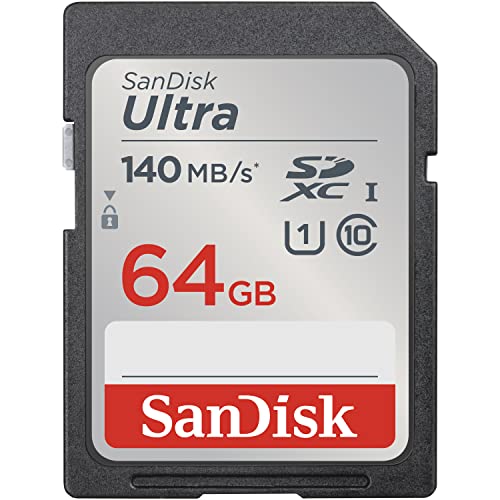 SanDisk Ultra SDXC UHS-I 64GB (140MB/s)
 SanDisk Ultra SDXC UHS-I 64GB (80MB/s)