Key takeaways
- Find the best woodworking CNC routers with spindle speed control for clean cuts in hardwood, plywood, and MDF, with four desktop machines compared.
Spindle speed control is one of the most useful features a woodworking CNC router can have. Different woods, bit sizes, and cut types all ask for different spindle speeds. Hard maple wants a slower, steadier pass than soft pine. A large surfacing bit needs a lower speed than a small engraving bit. When the spindle speed is fixed, the operator has to work around the machine. When it can be adjusted, the machine works around the job.
Desktop CNC routers now bring that kind of control to home workshops. The machines below all let the operator set spindle speed, either through a dial on the trimmer router, through the control software, or both. Each one is a three-axis desktop CNC router built for cutting and carving wood, and each one is available on Amazon US. This guide compares four of them, explains how spindle speed control works on each type of machine, and covers what to look for before choosing one.
At a Glance
| Machine | Work Area | Spindle | Speed Control | Best For |
|---|---|---|---|---|
| Genmitsu 4040-PRO MAX | 410 x 405 x 77 mm | 710W trimmer router | Variable speed dial on the trimmer | Larger hardwood projects and mixed materials |
| Genmitsu 4040-PRO | 400 x 400 x 80 mm | Trimmer router | Variable speed dial on the trimmer | Balanced size and capability for general woodworking |
| FoxAlien Masuter Pro | 400 x 400 x 60 mm | 300W spindle, 10,000 RPM | Speed set through the controller and software | Beginners who want an all-metal frame |
| Genmitsu 3018-PROVer V2 | 284 x 180 x 40 mm | Spindle motor | Speed set through GRBL commands and the offline controller | Small parts, signs, and learning CNC |
1. Genmitsu 4040-PRO MAX CNC Router Machine with 710W Spindle

The Genmitsu 4040-PRO MAX is the most powerful machine in this guide. Its 710W trimmer router gives it the cutting strength to work through hardwood, plywood, MDF, and acrylic, and the trimmer carries a variable speed dial so the operator can match spindle speed to the material and the bit. A lower speed suits large bits and dense hardwood, while a higher speed suits small bits and light engraving work.
The work area measures 410 x 405 x 77 mm, which is generous for a desktop machine. Signs, cabinet door panels, inlay work, and small furniture parts all fit comfortably. Linear rails on the X and Z axes keep the gantry moving smoothly, and the reinforced spoilboard with T-track makes workholding straightforward. The machine uses GRBL control, so it works with common CNC software, and the upgraded mainboard supports wireless control with an optional Wi-Fi module.
The 100 mm pass height is another useful detail. It lets the machine clear taller stock and taller fixtures without the gantry running out of room, which matters when cutting thicker boards or working with clamps that sit above the spoilboard.
Listing Features
- 710W trimmer router with variable speed control
- 410 x 405 x 77 mm work area
- Linear rails on X and Z axes
- GRBL control with wireless support
- Reinforced spoilboard with T-track
- 100 mm pass height for taller stock
- Cuts wood, metal, and acrylic
Considerations
- The larger frame needs a solid, level bench with room around it for the gantry to travel.
- A 710W trimmer is heavier than a small DC spindle, so assembly and squaring the frame deserve care.
- The optional Wi-Fi module is sold separately.
2. Genmitsu 4040-PRO CNC Router Machine
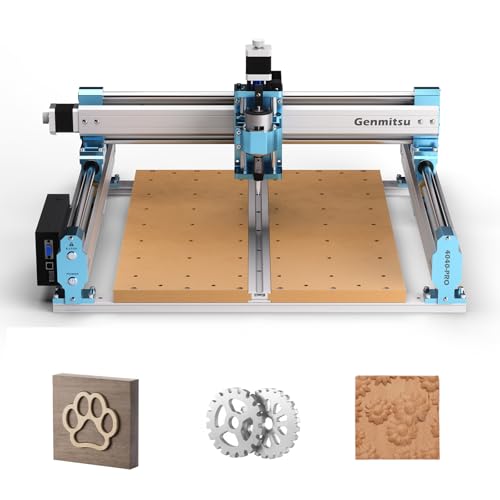
The Genmitsu 4040-PRO is the balanced pick in the 4040 range. It shares the same 400 mm class work area as the MAX, measuring 400 x 400 x 80 mm, but it uses a lead screw drive on the axes and a trimmer router with variable speed control. For woodworking, that combination covers a wide range of jobs, from carved signs and plaques to relief panels and joinery parts.
Spindle speed control on this machine comes from the trimmer itself. The dial on the router body lets the operator raise or lower the speed before a cut, which is a simple and reliable way to adjust for different woods. Dense hardwoods such as oak and walnut cut more cleanly at moderate speeds with a steady feed, while softwoods and MDF tolerate higher speeds. The lead screw drive keeps the gantry moving at a steady pace, which pairs well with a fixed speed setting for the duration of a job.
The frame uses steel tube construction, which gives the machine a rigid feel for its size. The open frame design also makes it easy to reach the work area for clamping, bit changes, and clearing chips between passes.
Listing Features
- Trimmer router with variable speed dial
- 400 x 400 x 80 mm work area
- Lead screw driven axes
- GRBL control
- Steel tube frame construction
- Three-axis engraving and milling for wood, acrylic, and metal
Considerations
- The trimmer router is louder than a small DC spindle, so hearing protection is a sensible habit.
- The open frame leaves chips free to spread, so a dust shoe or a regular cleanup routine helps.
- The work area is large for a desktop machine, so measure the bench before ordering.
3. FoxAlien Masuter Pro 3-Axis CNC Router Machine

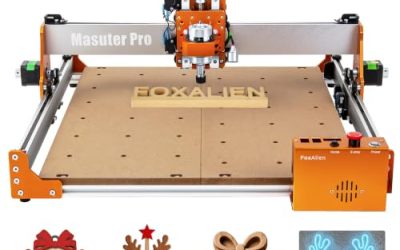
The FoxAlien Masuter Pro is built around an all-metal frame with a linear rail Z-axis, which gives it a stable and precise feel for a beginner-friendly machine. The work area is 400 x 400 x 60 mm, so it handles the same size of sign and panel work as the Genmitsu 4040 machines, in a frame that many woodworkers find easier to assemble and square.
The included spindle runs at up to 10,000 RPM, and its speed is set through the controller and the GRBL software rather than a dial on the motor. That means spindle speed can be written into the toolpath itself, so each operation in a job can run at its own speed without the operator stopping the machine to adjust anything by hand. Roughing passes can run at one speed and finishing passes at another, all inside the same program.
Two spindle clamps are included, sized at 52 mm and 65 mm, so the machine can accept a range of spindle motors and trimmer routers. That makes the Masuter Pro a good base for later upgrades, since a larger spindle can be fitted without changing the frame. The dust-resistant controller box keeps the electronics protected, and the emergency stop and home buttons are easy to reach.
Listing Features
- All-metal frame with linear rail Z-axis
- 400 x 400 x 60 mm work area
- 300W spindle with speed set through the controller and software
- Two spindle clamps, 52 mm and 65 mm, for spindle upgrades
- Dust-resistant controller box with emergency stop
- Z-probe included
- Cuts wood, acrylic, MDF, and nylon
Considerations
- The 60 mm Z travel is the smallest in this guide, so thick stock and tall fixtures need planning.
- The included spindle is suited to wood and soft materials; heavy hardwood removal is slower than with a 710W trimmer.
- The controller box needs a clear spot on the bench beside the machine.
4. Genmitsu 3018-PROVer V2 CNC Milling Machine

The Genmitsu 3018-PROVer V2 is the compact machine in this guide, and it is the natural starting point for someone learning CNC woodworking. Its work area is 284 x 180 x 40 mm, which suits small signs, coasters, jewelry boxes, inlay pieces, and engraved plaques. The smaller size also means it fits on a standard workbench or even a sturdy desk, and it is easier to move and store than a 4040 class machine.
Spindle speed on the 3018-PROVer V2 is adjustable through GRBL commands and through the offline controller, so the operator can set the speed for each job without touching the spindle itself. Limit switches on all three axes, an emergency stop button, and a Z-probe come as standard, which helps a beginner avoid the most common setup mistakes. The aluminum spoilboard gives a flat and durable surface for clamping small workpieces, and the upgraded Z axis keeps the spindle steady during cuts.
For woodworking, the 3018-PROVer V2 handles pine, plywood, MDF, basswood, and thin hardwood stock well. It is also a good machine for learning feeds and speeds, since the smaller scale makes the effect of a speed change easy to see in the finished surface.
Listing Features
- Spindle speed adjustable through GRBL and the offline controller
- 284 x 180 x 40 mm work area
- Full aluminum structure with aluminum spoilboard
- Limit switches on all axes
- Emergency stop button
- Z-probe included
- Suited to wood, acrylic, MDF, plastic, and PVC
Considerations
- The work area is too small for large signs or furniture parts.
- The 40 mm Z travel limits the thickness of stock that can be cut.
- Small bits and light passes suit this machine better than aggressive deep cuts.
How to Choose
Start with the size of the projects you plan to cut. If most of your work is signs, plaques, and cabinet parts up to about 400 mm across, a 4040 class machine is the right scale. If your work is small items and learning pieces, a 3018 class machine is enough, and its smaller footprint is easier to live with.
Next, think about how you want to control spindle speed. A trimmer router with a speed dial, as on the two Genmitsu 4040 machines, is simple and direct: set the dial before the cut and it stays there. A spindle whose speed is set through the controller and software, as on the FoxAlien Masuter Pro and the 3018-PROVer V2, lets the speed change between operations inside one program, which is useful when a job mixes roughing and finishing.
Spindle power matters for hardwood. A 710W trimmer cuts through dense wood with fewer passes than a 300W spindle, and it handles larger bits more comfortably. A smaller spindle still cuts hardwood, but it needs lighter passes and more patience. Match the spindle to the hardest wood you expect to cut regularly, not just the softest.
Frame rigidity is worth attention too. Linear rails and all-metal frames reduce flex during cuts, which shows up as cleaner edges and less chatter on the surface. Lead screw drives move steadily and hold position well, which suits detailed work. Both designs appear in this guide, and both work well for wood when the machine is assembled square.
Finally, consider the software path. All four machines in this guide use GRBL control, so they work with widely used CNC software for design and toolpath generation. Check that the software you plan to use supports GRBL and that your computer has a spare USB port for the controller connection.
Fit and Installation Considerations
A desktop CNC router needs a flat, level, and sturdy bench. The bench should be larger than the machine itself so there is room for the controller box, the power supply, and clamps that extend past the frame. A wobbly table will show up in the cut quality, so a solid workbench or a heavy table is better than a light folding table.
Allow space around the machine for the gantry to travel and for the operator to reach the work area. The 4040 class machines need roughly a 600 mm square of bench space once cables and the controller are counted, while the 3018-PROVer V2 fits in a smaller footprint. Keep the area clear of loose tools and offcuts that could catch on the moving gantry.
Assembly takes time on every machine in this guide. Set aside an unhurried session, follow the manual step by step, and check that the frame is square before tightening everything down. A frame that is out of square will cut rectangles that are slightly out of true, and that error is hard to fix later. A simple carpenter’s square and a straight edge are enough to check the main axes.
Wiring is straightforward on all four machines, with labeled cables and connectors, but route the cables so they do not snag on the moving parts. The drag chain or cable guides supplied with the machine should be used rather than left off. Keep the power supply in a spot where air can circulate around it.
Dust collection is worth planning from the start. Wood dust from CNC cutting is fine and spreads quickly. A dust shoe on the spindle, a shop vacuum, or even a simple enclosure around the machine all help. At a minimum, wear a dust mask and hearing protection during cutting, and keep a brush handy for clearing chips between passes.
Before the first real project, run a test cut on a scrap piece of the same wood. Check the depth of cut, the edge quality, and whether the spindle speed and feed rate suit the material. A short test on scrap saves a good board from a wrong setting.
Frequently Asked Questions
What spindle speed should I use for hardwood?
There is no single speed that suits every hardwood, bit, and cut. As a starting point, use a moderate speed with a small bit and a steady feed, then inspect the edge of the cut. If the edge looks burned, the speed is too high or the feed is too slow. If the edge looks torn or fuzzy, the speed may be too low or the feed too fast. Adjust one setting at a time on scrap wood until the cut is clean.
Is a trimmer router or a DC spindle better for woodworking?
Both work well for wood. A trimmer router with a speed dial is simple to set and brings more power, which helps with hardwood and larger bits. A DC spindle with software speed control lets the speed change between operations in one program, and it tends to run quieter. Choose the trimmer when cutting power matters most, and the DC spindle when quiet running and programmed speed changes matter most.
Can these machines cut materials other than wood?
Yes. All four machines in this guide also cut acrylic, MDF, PVC, and soft plastics, and they can engrave soft metals such as aluminum with light passes and suitable bits. The larger machines handle thicker acrylic and light aluminum better than the compact 3018, which is best kept to wood and soft materials.
Do I need extra accessories to get started?
Each machine ships with the basics: the frame, spindle or trimmer, controller, cables, a Z-probe, and a small set of bits. Useful additions are a set of flat end mills and V-bits in common sizes, extra clamps or a hold-down kit, a dust shoe, and a spoilboard surfacing bit. A spare set of bits is worth having, since a dull bit is the most common cause of poor cut quality.
Conclusion
Spindle speed control turns a desktop CNC router from a fixed-speed tool into a flexible woodworking machine. The Genmitsu 4040-PRO MAX leads this guide for power and work area, with a 710W trimmer and a generous 410 x 405 mm bed. The Genmitsu 4040-PRO gives the same class of work area with a simpler lead screw design. The FoxAlien Masuter Pro combines an all-metal frame with software-controlled spindle speed and room to upgrade the spindle later. The Genmitsu 3018-PROVer V2 is the compact starting point, with adjustable spindle speed, limit switches, and a size that fits almost any bench.
Choose by project size first, then by how you want to set spindle speed, and then by spindle power for the hardest wood you cut. Any of these four machines will cut clean signs, panels, and carved parts in wood once the speed and feed are matched to the material, and a short test cut on scrap is the fastest way to find the settings that work for your workshop.
As an Amazon Associate, we earn from qualifying purchases.