We independently review everything we recommend. When you buy through our links, we may earn a commission. As an Amazon Associate we earn from qualifying purchases.
4 Best and Strongest Wireless Routers (November 2026)
Four strong wireless routers compared: Wi-Fi 6 speed, antenna design, coverage, and ports for homes with many connected devices.
Four strong wireless routers compared: Wi-Fi 6 speed, antenna design, coverage, and ports for homes with many connected devices.
A router earns the word strongest in one place only: the far corner of your home, where the signal has to cross walls, floors, and a dozen competing devices. Top speed on the box matters less than how the router holds a connection at distance, how many devices it can serve at once, and whether its ports and security features match your internet plan. A household with two people streaming video needs something different from a house full of smart cameras, consoles, and laptops all online at the same time.
This guide is for homes where the current router drops out in back rooms, struggles when everyone is online, or cannot keep up with a fast internet plan. The four Wi-Fi 6 routers below were picked from their Amazon product pages by wireless standard, antenna count, port selection, coverage, and security features, so you can match the router to your floor plan and your device count instead of buying on speed numbers alone.
Quick Picks
As an Amazon Associate we earn from qualifying purchases.
Product
Best for
Key spec from title
TP-Link Archer AX21
A first Wi-Fi 6 upgrade for a small home with a modest device count
AX1800 WiFi 6 router, dual band, gigabit
TP-Link Archer AX55
A busy household that needs faster wireless and a USB port for sharing
AX3000 Wi-Fi 6 router, dual band, USB 3.0
ASUS RT-AX55
A family home that wants built-in security and parental controls
AX1800 dual band WiFi 6 gigabit router, lifetime internet security
NETGEAR Nighthawk RAX36
A larger home with many devices and rooms far from the router
A router cannot deliver more speed than your plan provides, and buying a multi-gigabit router for a 200 Mbps plan wastes its best feature. Check your plan speed first, then look at the router’s port speeds: gigabit ports suit most plans, while a 2.5 Gbps port only helps if your plan and modem support it. The routers here are all gigabit-class on their LAN ports, which fits the plans most homes actually buy. Match the router to the plan, and spend the difference on coverage rather than on speed you cannot use.
Count devices, not just rooms
Phones, laptops, TVs, consoles, smart speakers, cameras, and thermostats all compete for airtime, and older routers slow down as the count grows. Wi-Fi 6 handles this with OFDMA and MU-MIMO, which let the router talk to several devices in the same transmission window instead of one at a time. The Nighthawk RAX36 names 25 devices in its listing, a useful yardstick if your home is full of connected gear. Walk through your home and count everything with a Wi-Fi radio before choosing — most households are surprised by the total.
Antennas and placement decide real coverage
Four external antennas with beamforming focus the signal toward your devices instead of scattering it evenly, which helps in rooms far from the router. Still, no antenna beats a bad location: a router hidden in a basement corner or behind a metal cabinet will underperform any spec sheet. Place the router centrally, elevated, and out in the open, away from thick walls and large appliances. If one router still cannot reach the far bedrooms, look for a model with EasyMesh or mesh support so you can add a second unit later instead of replacing the whole setup.
Read the security and management features
WPA3 is the current standard for Wi-Fi security, and all four routers here support it, along with parental controls of some kind. Beyond that, the differences are practical: VPN client and server support matters if you work from home, HomeShield and lifetime internet security add network-level protection, and a USB port lets you share a drive or printer across the network. Check whether the management app fits your habits, because a router you cannot configure easily is a router whose features stay switched off.
The 4 Best Options
TP-Link Archer AX21
Top Pick
TP-Link Archer AX21
Best for: Small homes upgrading to Wi-Fi 6 where a straightforward, reliable router is more useful than extra ports.
Wireless standard: Wi-Fi 6 (802.11ax), dual band
Speed: AX1800, up to 1200 Mbps on 5 GHz and 574 Mbps on 2.4 GHz
The Archer AX21 is the sensible starting point for a small home moving to Wi-Fi 6. It delivers AX1800 speeds — up to 1200 Mbps on 5 GHz and 574 Mbps on 2.4 GHz — through four beamforming antennas, while OFDMA and MU-MIMO keep several devices moving at once. Five ports cover wired connections for a TV or console, and EasyMesh support lets you add another compatible unit later if a dead zone appears. Setup runs through the Tether app or a web interface, with a 2-year warranty behind it. It needs a separate modem and has no USB port, so it suits homes that do not need network storage.
TP-Link Archer AX55
Runner-Up
TP-Link Archer AX55
Best for: Busy households that want faster Wi-Fi 6, a USB port for sharing, and VPN support for remote work.
Against the AX21, the Archer AX55 adds the two things a busier home notices first: more wireless speed and a USB 3.0 port. Its AX3000 rating reaches 2976 Mbps across the two bands, with four antennas, OFDMA, MU-MIMO, and beamforming carrying the signal through walls. The USB port lets you share a drive on the network, and VPN client and server support plus HomeShield cover remote work and family security. It carries 512 MB of RAM, keeps the AX21’s five-port layout and 2-year warranty, and stays EasyMesh compatible for later expansion. For a household with several streamers and many smart devices, the extra headroom is the point.
ASUS RT-AX55
ASUS RT-AX55
Best for: Family homes that want built-in security and parental controls alongside solid AX1800 Wi-Fi 6 speed.
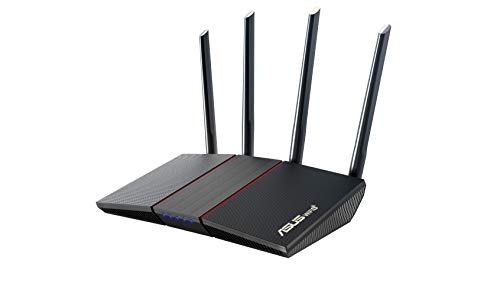
The ASUS RT-AX55 is the pick for a family home where security and control matter as much as speed. It is an AX1800 dual-band Wi-Fi 6 router with MU-MIMO, OFDMA, and beamforming, plus four gigabit LAN ports for wired devices. What sets it apart is lifetime internet security and parental controls built into the firmware, along with mesh Wi-Fi support for extending coverage later. The router suits parents who want to manage screen time and block malicious sites without buying a separate subscription, and its gigabit ports handle consoles and streaming boxes without fuss. Setup is straightforward, and its feature set is the deepest here for its speed class.
NETGEAR Nighthawk RAX36
The Nighthawk RAX36 is the coverage pick. Its listing names 2,000 sq. ft. of coverage and 25 devices, which fits a larger home or one where the router sits far from the bedrooms. AX3000 wireless speed reaches 3 Gbps across the bands, and a VPN, USB 3.0 port, and gaming-friendly design round out a router built for a house full of gear. It is the entry point to the Nighthawk family, so it suits buyers who want that feature set without paying for the top tier. Like every router here, it needs a separate modem, and its strongest case is a home where distance, not raw speed, is the problem.
Specs
Wireless standard: Wi-Fi 6 (802.11ax), dual band
Speed: AX3000, up to 3 Gbps
Coverage: up to 2,000 sq. ft.
Devices: up to 25 devices
Ports: gigabit ports, plus USB 3.0
Features: built-in VPN, gaming support
Model number: RAX36-100PAS
Best for: Larger homes where coverage across 2,000 sq. ft. and support for 25 devices matter most.
Watch out for: Confirm your modem is compatible and your plan speed justifies AX3000 — a slow plan will not use the extra headroom.
ASIN: B0DK7RVXHP
Which One Fits Your Situation
You live in a small home and want a simple Wi-Fi 6 upgrade
Choose the TP-Link Archer AX21. Its AX1800 speed fits most internet plans, four antennas with beamforming cover a small floor plan, and EasyMesh leaves room to grow. Skip it only if you need a USB port or VPN features, which the AX55 adds for a busier setup.
Your household streams, games, and works from home at the same time
Choose the TP-Link Archer AX55. AX3000 speed, 512 MB of RAM, and a USB 3.0 port handle the load, while VPN client and server support and HomeShield cover remote work and family security. It is the most versatile router in this guide for a home with many simultaneous users.
You need parental controls and security without a subscription
Choose the ASUS RT-AX55. Its lifetime internet security and parental controls are built into the firmware, and mesh support lets you extend coverage later. The AX1800 speed is enough for most family plans, and the four gigabit LAN ports cover wired consoles and streaming boxes.
Your router sits far from the rooms that need signal
Choose the NETGEAR Nighthawk RAX36. The listing’s 2,000 sq. ft. coverage and 25-device support are aimed squarely at larger homes, and the built-in VPN and USB 3.0 port add flexibility. Place it centrally and elevated, and add a mesh unit later if the farthest room still struggles.
Common Mistakes
Buying a router faster than your internet plan, then wondering why speeds never change.
Hiding the router in a basement corner or behind a metal cabinet and blaming the hardware.
Forgetting that every router here needs a separate modem — the router alone does not connect you to the internet.
Counting rooms instead of devices and underestimating how many gadgets share the network.
Leaving the default admin password and Wi-Fi security settings unchanged after setup.
Frequently Asked Questions
Do I need a modem as well as a router?
Yes, for most homes. The routers in this guide connect your devices to each other and to the internet, but they need a modem — or a modem-router combo — to reach your internet provider. Check whether your provider rents a modem or allows your own, and confirm compatibility before ordering a router.
What is the difference between AX1800 and AX3000?
The number is the combined top speed across both bands: AX1800 reaches about 1.8 Gbps in total, while AX3000 reaches about 3 Gbps. In practice the difference shows when many devices stream or download at once, or when your plan is fast enough to use the extra headroom. A slower plan will not benefit from the higher number.
How many devices can a Wi-Fi 6 router handle?
Wi-Fi 6 uses OFDMA and MU-MIMO to serve several devices in the same transmission window, so it copes better than older standards with a crowded network. The Nighthawk RAX36 names 25 devices in its listing. Count every phone, TV, console, camera, and smart speaker in your home before choosing.
Where should I place my router for the strongest signal?
Put it centrally, elevated on a shelf or table, and out in the open — not in a cabinet, behind a TV, or in a basement corner. Keep it away from thick walls, metal objects, and large appliances. If the far rooms still struggle, a mesh-compatible router lets you add a second unit instead of replacing the first.
A
admin
We compare specs, materials and verified owner reviews before a product earns a spot. Rankings are never paid.
Affiliate disclosure. As an Amazon Associate we earn from qualifying purchases at no extra cost to you. Prices accurate as of the date shown.
The best looking Titan armor sets in Destiny 2, ranked for collectors. Compare the top Titan figures and statues that bring the iconic armor to your shelf.
The best portable iPhone chargers are power banks matched to your port. Compare five MagSafe, built-in cable, and plug-in battery packs for iPhone here.
Four belt-drive turntables that change speed electronically, by switch, button or servo control, with no belt moving by hand: Pro-Ject, Fluance and Denon picks compared.
The best hobby greenhouses compared on footprint, frame and glazing: twin-wall polycarbonate kits, a cedar walk-in with a fan, and a roomy PE tunnel house.
Looking for the best tube integrated amplifiers for dedicated listening rooms? Compare four valve amps for warm sound, speaker matching, and room size.
Compare five three-way floor-standing speakers with removable grilles, with driver layouts, amplifier matching and room-fit guidance for November 2026.